Delete a user (pseudonymize)
How to delete a user?
Written By Zemtu
Last updated 8 months ago
Overview
In the Zemtu system, you can use the function pseudonymize to delete/pseudonymize a user. During this process, all personal user data will be deleted. The user's past trips are linked to an anonymous user to ensure that the statistics remain accurate.
How to
Zemtu → User → Edit User
Click the button Pseudonymize on the right side.
A confirmation dialog will be displayed, which needs to be confirmed.
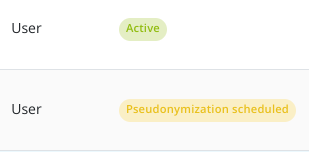
The user will then be displayed with the status Pseudonymization scheduled.
14 days after the pseudonymization process has been initiated, the user's data will be irreversibly anonymized. Within these 14 days, you can cancel the pseudonymization at any time in the menu User → Edit User.
Questions & Answers
Can I restore a deleted user?
Can I restore a deleted user?
Once a user has been pseudonymized, the user's data will be overwritten, and it will no longer be possible to trace the identity of the user. This action cannot be undone.
How long is it possible to restore a pseudonymized user?
How long is it possible to restore a pseudonymized user?
14 days. After these 14-days, there is no way to restore the data.
Still need help? Share an idea