Administration
Assign an OBU to a vehicle
Working with custom tags
Accreditation and membership
Change organization admins
Assign a chip card to a user
Deactivate a user temporarily
Delete a user (pseudonymize)
Gleap.io
Identity Check
Invite a user to a group (invitation link)
Manually create a user
Roles
Sign-up process
Gleap.io Banner
Support and daily business
Zemtu Cloud
Zones
Manually record chip cards (INVERS)
Manually record chip cards (Convadis)
Welcome screens
Working with vehicle tags
Make a group selectable in the signup
Vehicle Image Format
Carsharing Groups and Memberships
Damage reporting
Guest mode
Create a QR code that opens the App Store on iOS and the Play Store on Android.
Registration, reservation and usage
Billing
INVERS
Convadis
I LOCK IT
API
Website
Contact us
Changelog
    Home
  1. Administration
  2. Vehicle Image Format

Vehicle Image Format

What is the best way to upload the vehicle image for optimal results?

Written By Zemtu

Last updated About 2 months ago

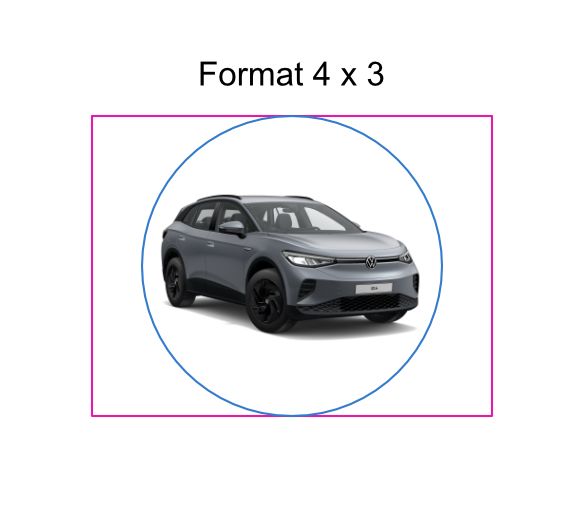
We display the vehicle image in various locations, including the app, the desktop scheduler, and the administration panel. The supported formats are primarily 4:3 and 1:1.

Ideally, the vehicle should be placed in the center of the image.
Was this helpful?