Cancel membership
How members end their membership in the app and how the cancellation form is configured.
Written By Zemtu
Last updated 1 day ago
Overview
Members can end their membership themselves in the app. The cancellation form collects optional feedback and always requires the account password before the request is submitted.
App → Settings → Membership → Cancel membership
Cancel membership is highlighted in red in the settings list. It opens the cancellation form.
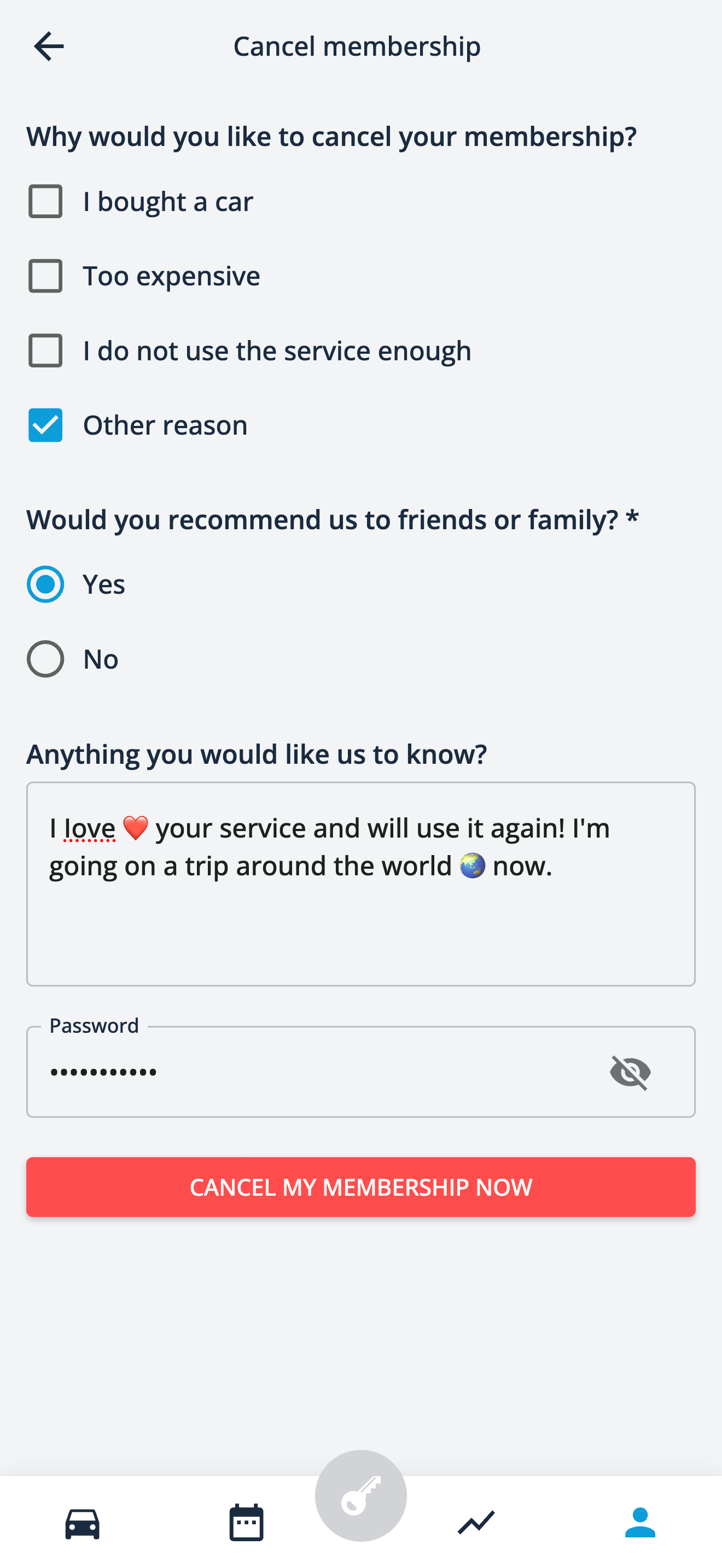
What the member fills in
Which questions are shown is configured per organization (see below). The form can contain:
Reason for cancellation – a list of reasons defined by the organization. Several reasons can be selected.
Recommendation – “Would you recommend us to friends or family?” (yes/no)
Comment – free text field for anything the member wants to share
Each of these questions can be optional or mandatory. The password is always required to confirm the cancellation.
The member finishes with Cancel my membership now.
After submitting
If the cancellation has to be reviewed, the member sees a notice that the deletion of the account is pending until the administration confirms it. The answers given in the form are stored with the user so that staff can see them while the request is pending.
Configuration
The form is controlled by the generic setting membershipCancellation:
reasons.enabledandreasons.options– list of reasons, each with anidentifierand a translatedlabel;reasons.requiredmakes a selection mandatorycomment.enabled/comment.required– free text feedbackrecommendation.enabled/recommendation.required– yes/no question
If no questions are configured, the member only enters the password.
Was this helpful?
Still need help? Share an idea