Reservation end times: Precise end, Snapped end and Date end
Why a finished reservation shows different end times for the trip, for billing and for the calendar.
Written By Zemtu
Last updated About 4 hours ago
Introduction
Reservations in Zemtu are booked in 30-minute slots that start on the hour or on the half hour. When a reservation is finished, Zemtu saves three end times. Each one answers a different question:
When exactly did the trip end? → Precise end
Up to when is the booked time billed? → Snapped end
When does the reservation end in the calendar? → Date end
To see them, open a finished reservation in the administration under Reservations → Reservations.


Example: a reservation finished early at 18:49. Date end is 18:30, Precise end 18:49:49 and Snapped end 19:00.
The three end times
In this article, booked end means the reservation's end at the moment it is finished, including any extension.
💡 Hint: If the reservation was extended, the extended end is the limit for Snapped end and Date end. If the trip ends exactly on the hour or half hour (for example 09:00), Snapped end and Date end are both that time.
Examples
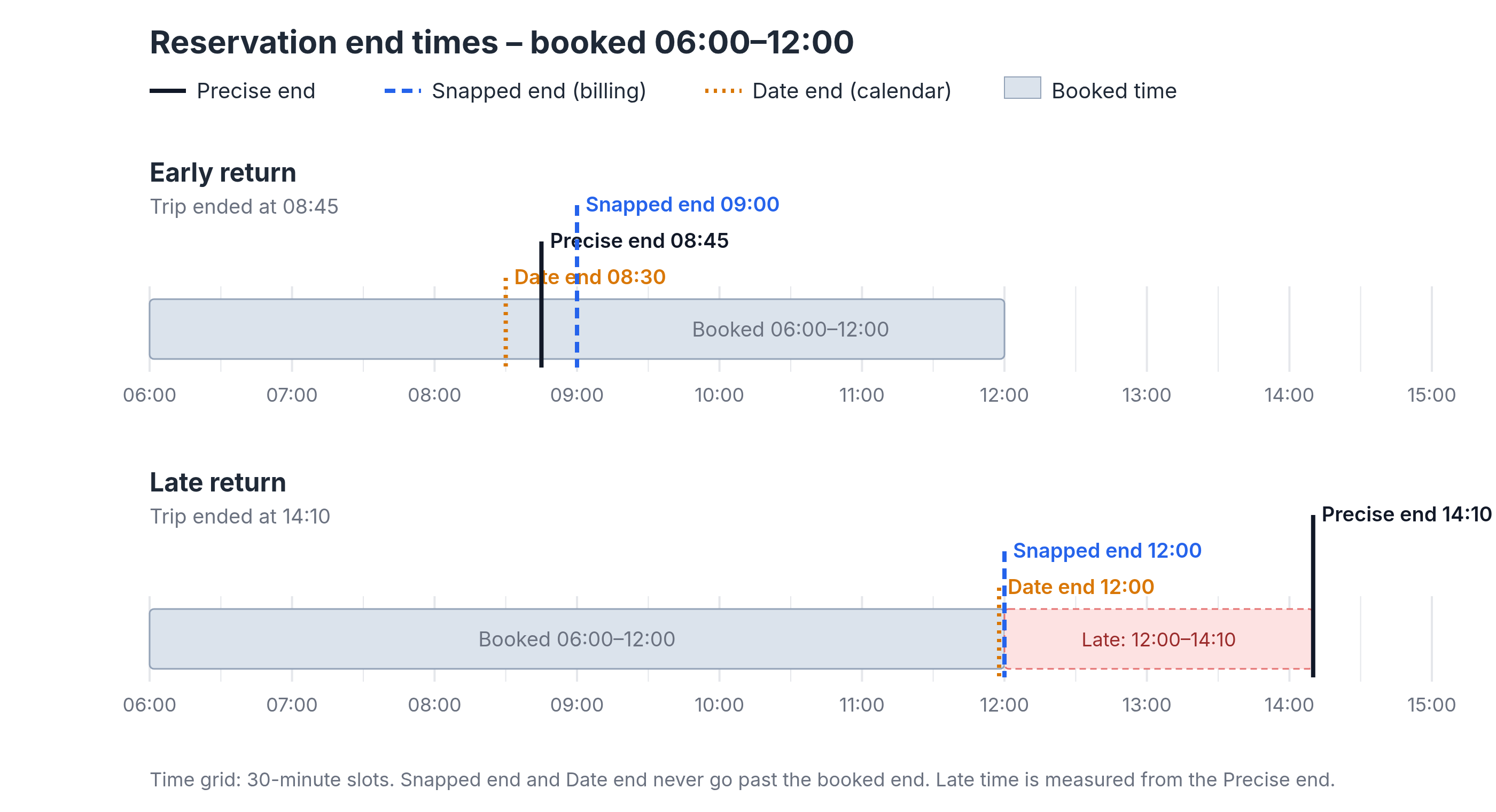
A reservation is booked from 06:00 to 12:00, without extension.
On the early return, Snapped end rounds up to 09:00 and Date end rounds down to 08:30, so after an early return the Date end is earlier than the Snapped end. Precise end keeps the actual finish time, 08:45. On the late return, Snapped end and Date end stay at the booked end, 12:00, and Precise end records the finish at 14:10.
In rare cases where the vehicle's end report reaches Zemtu after the booked end, Snapped end and Date end stay at the booked end.
Late returns and the grace period
Whether a return is late is based on the Precise end. The extra time isn't added to the Snapped end.
If a user brings the vehicle back late, they pay for the booked time as usual, plus their reservation rate's late return fee for the extra time after the booked end. If the rate has a grace period and the vehicle is back within it, there's no late fee. The fee amount and how the grace period works are set in the reservation rate. See Late return grace period and Overview - reservation rates.
The grace period only matters for billing. It doesn't change the Precise end, Snapped end or Date end.
💡 Hint: Snapped end isn't the final invoice. What the user pays depends on the reservation rate (late return fee, grace period, per-minute invoicing and other fees). See Late return grace period and Overview - reservation rates.
Per-minute invoicing
With Per-minute invoicing, the time fee is calculated from the precise start and the Precise end instead of the 30-minute slots. The late-start rule still applies: if the precise start is more than 30 minutes after the booked start, the booked start plus 30 minutes is used. See Per-minute invoicing.
Blocking time
Blocking time is a separate setting and has nothing to do with the Snapped end. It's a buffer after a reservation ends when nobody else can book the vehicle, for example to clean or charge it.
The default is set in the organization settings: Settings → Organizations → open your organization → section General → field Blocking time ("Default blocking time appended to each reservation"). New reservations get this value automatically. Organization admins can see it there but can't change it. If you'd like a different default, contact Zemtu support.
You can change it for a single reservation in the reservation's Blocking time field. You only see this field if your organization has a default Blocking time.
When the reservation is finished, its Blocking time is removed, so the vehicle can be booked again right after the Date end.
Blocking time isn't billed to the user.
See also
Was this helpful?
Still need help? Share an idea